PS Remote Play serves as a powerful bridge between your home console and your mobile lifestyle, allowing you to stream high-fidelity gaming directly to your Android device. By leveraging your local Wi-Fi connection, this utility transforms your smartphone into a portable powerhouse capable of running the latest blockbuster titles. It eliminates the need to be tethered to a television, providing a seamless transition from the big screen to a handheld experience. Whether you are in another room or simply want to relax away from your desk, the freedom to access your library remains constant.

PS Remote Play
PlayStation Mobile Inc.
Download
25.86 MB
PS Remote Play Screenshots
1 / 2
25.86 MB
Size
8.5.1
Version
6.0+
Android
Universal
Arch
About PS Remote Play
PS Remote Play serves as a powerful bridge between your home console and your mobile lifestyle, allowing you to stream high-fidelity gaming directly to your Android device. By leveraging your local Wi-Fi connection, this utility transforms your smartphone into a portable powerhouse capable of running the latest blockbuster titles. It eliminates the need to be tethered to a television, providing a seamless transition from the big screen to a handheld experience. Whether you are in another room or simply want to relax away from your desk, the freedom to access your library remains constant.
Seamless Console Connectivity
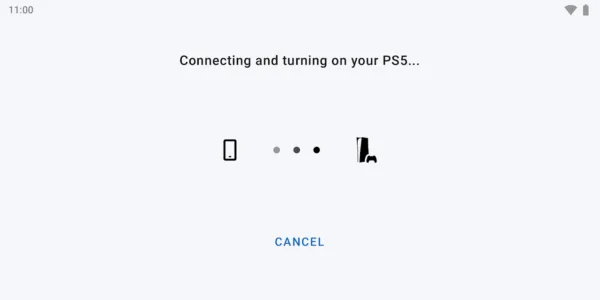
Setting up a connection between your handheld device and the console is remarkably straightforward and efficient. Once synchronized, the service maintains a stable link that mirrors the system’s output with minimal latency, ensuring that fast-paced action remains playable. This digital bridge utilizes advanced streaming technology to deliver crisp visuals and responsive inputs, making it feel as though the hardware is running locally on your phone. Users can easily switch between their PS5 and PS4 systems depending on which library they wish to explore at any given moment.
Full Controller Support
To maintain the authentic feel of modern gaming, this solution offers comprehensive compatibility with DualSense and DualShock 4 wireless controllers. Connecting your preferred peripheral via Bluetooth allows for a tactile experience that touchscreens simply cannot replicate, providing precision during intense gameplay sessions. The interface intelligently maps buttons and triggers, ensuring that every mechanic works exactly as it would on a traditional setup. This integration is vital for titles that require complex inputs or rapid reflexes, preserving the intended difficulty and immersion of the original design.
Intuitive On-Screen Controls
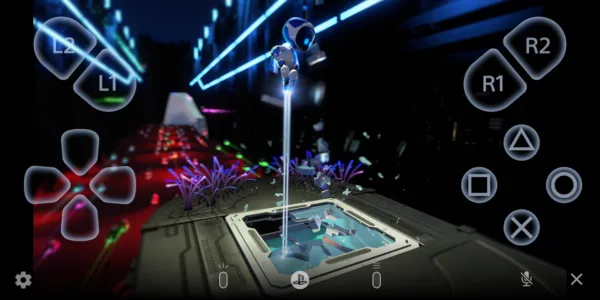
For those moments when a physical controller isn’t available, the platform provides a highly customizable set of virtual buttons that appear directly on your display. These on-screen inputs are designed to be transparent and non-intrusive, allowing you to see the game world clearly while maintaining full control over your character. You can adjust the layout and sensitivity to suit your personal playstyle, making it a viable option for RPGs or slower-paced adventures. This flexibility ensures that PS Remote Play remains functional even when you are traveling light without extra accessories.
High Definition Streaming
The visual quality provided by this tool is exceptional, supporting resolutions up to 1080p and high dynamic range for vivid colors and deep contrasts. Depending on the strength of your network, the stream automatically scales to provide the smoothest possible frame rate without sacrificing too much detail. This ensures that the cinematic beauty of modern titles is preserved, even when viewed on a smaller mobile screen. The result is a stunning visual experience that brings the power of a home console into the palm of your hand with surprising clarity.
Integrated Social Features
Staying connected with your gaming community is effortless through the built-in communication tools available within the interface. You can join party chats, send messages to friends, and view notifications just as you would while sitting in front of your console. This social integration means you never have to miss out on a group session or an important update from your gaming circle. This tool effectively replicates the entire ecosystem, ensuring that the social fabric of your gaming life remains intact regardless of your physical location.
Dynamic Network Optimization
Maintaining a consistent connection is a priority, and PS Remote Play includes several settings to optimize performance based on your current internet speed. Users can manually adjust bitrates and frame rates to prevent stuttering or disconnects during peak usage times on their home network. This level of control allows for a tailored experience that balances visual fidelity with technical stability, ensuring that the stream remains fluid. By fine-tuning these parameters, you can enjoy a lag-free session that feels responsive and reliable throughout your entire play period.
Frequently Asked Questions
Yes, you must own either a PlayStation 5 or a PlayStation 4 console that is updated to the latest system software and connected to a high-speed network.
While a high-speed Wi-Fi connection is recommended for the best stability, you can use mobile data if your cellular signal is strong enough to handle high-bandwidth streaming.
Yes, PS Remote Play is a free utility available for Android users, though you must have a valid PlayStation Network account to log in and access your consoles.
The service officially supports the DualSense wireless controller and the DualShock 4, both of which can be paired via Bluetooth to your Android device for a native feel.
Additional APP Information
Package Name
com.playstation.remoteplay
Developer
PlayStation Mobile Inc.
Category
Updated
Nov 6, 2025
Content Rating
Everyone
Signature
e99957023163a76c7ff9e01e355661d75bcbcc34
Get it On

You are now ready to download PS Remote Play for free. Here are some notes:
- Please read our APK Info and installation instructions carefully for the game & app to work properly
- Read the FAQ carefully for more details
4.8/5 (971 votes)